
Views: 222 Author: Tina Publish Time: 2025-05-29 Origin: Site


Content Menu
● What Is an IPS LED LCD Display?
● How Does IPS Technology Work?
● Key Features and Advantages of IPS LED LCD Displays
>> Slim and Energy-Efficient Design
>> Better Color Consistency Over Time
● IPS vs. Other Display Technologies
>> IPS vs. TN
>> IPS vs. VA
>> IPS vs. OLED
● Common Applications of IPS LED LCD Displays
● Visual Gallery: IPS LED LCD Displays in Action
● How to Choose the Right IPS LED LCD Display
>> Refresh Rate and Response Time
>> Color Gamut and Calibration
>> Connectivity
>> Ergonomics
>> Budget
● Care and Maintenance Tips for IPS LED LCD Displays
● Future Trends in IPS LED LCD Technology
>> 1. What is the main difference between IPS and LED displays?
>> 2. Are IPS LED LCD displays good for gaming?
>> 3. Do IPS LED LCD displays suffer from burn-in?
>> 4. Why do some IPS screens have a "glow" in the corners?
>> 5. Are IPS LED LCD displays more expensive than other types?
In today's digital world, the quality of your display can make a significant difference—whether you're editing photos, gaming, watching movies, or simply browsing the web. Among the many types of screens available, IPS LED LCD displays stand out for their vibrant colors, wide viewing angles, and impressive clarity. But what exactly is an IPS LED LCD display, and how does it differ from other display technologies? This comprehensive guide will break down the technology, its advantages, drawbacks, and real-world applications, with plenty of visuals and explanations to help you understand every aspect.
An IPS LED LCD display is a type of screen that combines two core technologies: IPS (In-Plane Switching) and LED-backlit LCD (Liquid Crystal Display). Here's what each term means:
- IPS (In-Plane Switching): A specific LCD panel technology that arranges liquid crystal molecules in a parallel (in-plane) orientation, allowing for superior color accuracy and much wider viewing angles compared to older LCD types.
- LED (Light Emitting Diode): Refers to the backlighting system used in the display. Instead of older fluorescent (CCFL) backlights, modern LCDs use LEDs, which are more energy-efficient, thinner, and brighter.
- LCD (Liquid Crystal Display): The fundamental technology that uses liquid crystals sandwiched between glass layers to modulate light and create images.
In short: An IPS LED LCD display is an LCD screen that uses IPS technology for the panel and LEDs for backlighting, resulting in a display that offers excellent color, clarity, and wide viewing angles.
The magic behind IPS displays lies in how the liquid crystal molecules are aligned and manipulated.
- Traditional LCDs (like TN panels): Liquid crystals twist vertically when voltage is applied, which can cause color and brightness shifts when viewed from an angle.
- IPS Panels: The liquid crystals rotate horizontally (in-plane) rather than vertically. When voltage is applied, the molecules move parallel to the glass layers, allowing light to pass through more evenly.
This unique arrangement provides:
- Consistent color and brightness from almost any angle.
- Reduced image distortion and color shifting.
- Improved clarity and color reproduction.
A typical IPS LED LCD display consists of several layers: the backlight (LEDs), polarizing filters, glass substrates, liquid crystal layer, color filters, and the display surface. The LEDs shine light through the liquid crystals, which are precisely controlled to allow varying amounts of light and color to pass through, forming the images you see.
IPS displays maintain color accuracy and clarity even when viewed from extreme angles—up to 178 degrees in all directions. This makes them ideal for collaborative work, sharing content, or group entertainment.
IPS panels are renowned for their ability to display rich, vibrant, and true-to-life colors. This is crucial for professionals in photography, video editing, and design, as well as for anyone who values image quality.
No matter where you sit, the image remains sharp and colors stay consistent, unlike some other panel types that suffer from color shifting or fading at angles.
Modern IPS displays have significantly improved response times, making them suitable for gaming and fast-moving video content. While not always as fast as the quickest TN panels, IPS displays now offer response times that are more than adequate for most users, including gamers.
LED backlighting allows for thinner, lighter, and more energy-efficient screens compared to older CCFL-backlit LCDs. This means devices can be made sleeker and more portable without sacrificing display quality.
IPS panels are generally more robust and less prone to pressure marks or distortion when touched. This makes them a good choice for touchscreens and portable devices.
IPS technology tends to maintain its color accuracy and brightness longer than some other panel types, ensuring a longer lifespan for your display investment.
Let's compare IPS LED LCD displays with other common display types:
| Feature | IPS LED LCD | TN (Twisted Nematic) LCD | VA (Vertical Alignment) LCD | OLED |
|---|---|---|---|---|
| Viewing Angles | Excellent (178°) | Poor | Moderate | Excellent (near 180°) |
| Color Accuracy | Excellent | Poor to Moderate | Good | Excellent |
| Contrast Ratio | Good | Moderate | Excellent | Outstanding (infinite) |
| Response Time | Good (1-5ms modern) | Excellent (1ms) | Moderate | Excellent |
| Black Levels | Good | Poor | Excellent | Outstanding (true black) |
| Power Consumption | Moderate | Low | Moderate | Low to Moderate |
| Price | Moderate to High | Low | Moderate | High |
| Burn-in Risk | None | None | None | Possible |
| Best For | General use, creative work, gaming | Budget gaming, office | Movies, dark rooms | High-end, creative work |
TN panels are faster and cheaper but suffer from poor color reproduction and narrow viewing angles. IPS panels are superior for color-critical work and shared viewing.
VA panels offer better contrast and deeper blacks but may have slower response times and slightly narrower viewing angles. IPS is better for color accuracy and consistency.
OLED panels provide perfect blacks and vibrant colors, but they are more expensive and can suffer from burn-in. IPS LED LCDs are more affordable, durable, and do not have burn-in issues, making them a practical choice for many users.
IPS LED LCD displays are found in a wide range of devices and industries:
- Consumer Electronics: TVs, computer monitors, laptops, smartphones, and tablets.
- Professional Use: Graphic design, photography, video editing, medical imaging, and CAD work.
- Public Displays: Digital signage, advertising boards, information kiosks.
- Automotive: Dashboard displays, infotainment systems.
- Industrial and Medical Equipment: Control panels, diagnostic devices, handheld terminals.
- Gaming: Gaming monitors and portable gaming devices.
- Wearables: Smartwatches and fitness trackers.
The use of IPS LED LCD displays in these fields is driven by their superior image quality, reliability, and versatility.
While IPS LED LCD displays offer many benefits, they are not without downsides:
- Lower Contrast Ratios: Compared to VA and OLED panels, IPS displays typically have lower contrast, resulting in less deep blacks.
- Higher Power Consumption: IPS panels can consume more power than TN or OLED screens, especially at higher brightness levels.
- Price: IPS displays are generally more expensive than TN or basic LED-backlit LCDs.
- IPS Glow: A phenomenon where the corners of the screen appear to glow, especially in dark environments.
- Response Time: Although modern IPS panels have improved, some may still lag behind the fastest TN panels in high-speed gaming scenarios.
To better understand the unique qualities of IPS LED LCD displays, imagine the following scenarios:
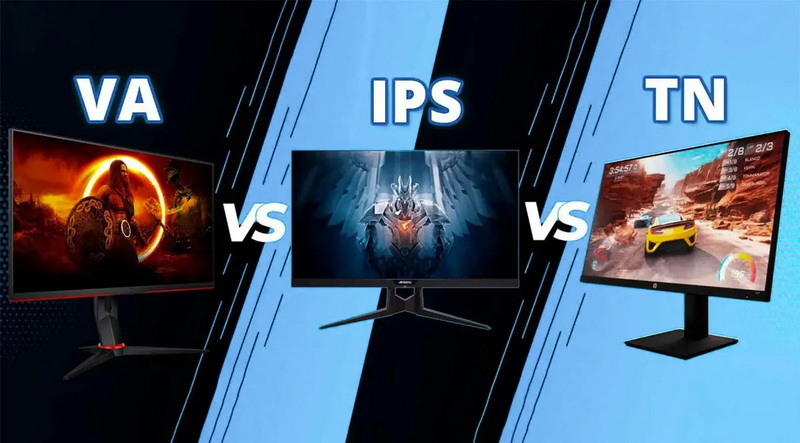
- Side-by-Side Comparison: Three monitors, each using a different panel technology (IPS, TN, VA), display the same colorful image. The IPS monitor shows vibrant, accurate colors from every angle, while the TN panel's colors fade and distort when viewed from the side.
- Professional Studio: A designer works on a high-resolution image, relying on the IPS panel's color accuracy to ensure their project looks perfect on any device.
- Gaming Setup: A gamer enjoys a fast-paced action game, benefiting from the IPS display's quick response time and wide viewing angles, allowing friends to watch from different positions without color distortion.
- Mobile Device: A smartphone with an IPS LED LCD screen displays a vivid photo, maintaining clarity and brightness even in direct sunlight or when tilted.
When selecting an IPS LED LCD display, consider the following factors:
Choose a size and resolution that fits your workspace and needs. Higher resolutions (such as 4K) provide sharper images, which is beneficial for creative work or large displays.
For gaming or fast video content, look for higher refresh rates (120Hz or above) and lower response times (1-5ms).
If you work with color-sensitive tasks, check the display's color gamut (sRGB, Adobe RGB, DCI-P3) and whether it supports hardware calibration.
Ensure the display has the right ports (HDMI, DisplayPort, USB-C) for your devices.
Adjustable stands, VESA mount compatibility, and blue light filters can enhance comfort and usability.
Balance your desired features with your budget. While IPS displays are more expensive than TN panels, they offer better long-term value for most users.
To maximize the lifespan and performance of your IPS LED LCD display:
- Keep It Clean: Use a microfiber cloth and gentle cleaning solution to wipe the screen. Avoid harsh chemicals or abrasive materials.
- Avoid Direct Sunlight: Prolonged exposure to sunlight can degrade the display over time.
- Use Proper Settings: Adjust brightness and contrast for your environment to reduce eye strain and extend the display's life.
- Handle with Care: Avoid pressing hard on the screen or exposing it to physical shocks.
- Update Firmware: If your display supports firmware updates, keep it up to date for optimal performance.
The future of IPS LED LCD displays looks promising, with ongoing innovations including:
- Mini-LED Backlighting: This technology uses thousands of tiny LEDs for improved brightness, contrast, and local dimming, bringing IPS displays closer to OLED performance.
- Higher Refresh Rates: IPS panels are now available with refresh rates up to 360Hz, making them even more appealing for competitive gaming.
- Better Power Efficiency: Advances in backlighting and panel design are reducing power consumption, making IPS displays more eco-friendly.
- Flexible and Curved IPS Displays: New manufacturing techniques are enabling curved and even flexible IPS screens for immersive experiences and innovative device designs.
- Improved Color Gamut: Enhanced color reproduction is making IPS displays suitable for even the most demanding professional applications.
An IPS LED LCD display represents the best of both worlds in modern screen technology. By combining the wide viewing angles and superior color accuracy of IPS panels with the energy efficiency and slim design of LED backlighting, these displays are a top choice for professionals, gamers, and everyday users alike. While they may cost more and consume slightly more power than some alternatives, their advantages in image quality, consistency, and versatility make them a worthwhile investment for anyone who values a premium visual experience.
Whether you're a creative professional, a gamer, or simply someone who appreciates beautiful visuals, an IPS LED LCD display can elevate your digital experience. As technology continues to evolve, IPS displays will only become more advanced, offering even greater performance and value.
IPS refers to the panel technology (how the liquid crystals are arranged), while LED refers to the type of backlight used. Most modern IPS displays use LED backlighting, so an "IPS LED LCD" combines both technologies for better color and efficiency.
Yes, modern IPS LED LCD displays offer fast response times, excellent color accuracy, and wide viewing angles, making them suitable for gaming. However, some competitive gamers may still prefer TN panels for ultra-fast response times.
No, IPS LED LCD displays do not suffer from burn-in like OLED displays. They are generally more durable for static content.
This is known as "IPS glow," a common characteristic where the corners of the screen appear to glow, especially in dark environments. It is a technical limitation of the IPS technology but can often be minimized by adjusting brightness or viewing angles.
Generally, yes. IPS panels cost more to manufacture than TN or basic LED-backlit LCDs, but their superior color and viewing angles often justify the price for many users.


