
Views: 222 Author: Tina Publish Time: 2025-05-06 Origin: Site


Content Menu
● What Are OLED Screens and How Do They Differ from LEDs?
● Is It Safe to Attach LED Lights to the Back of an OLED Screen?
● Benefits of Installing LED Lights Behind OLED Screens
● How to Attach LED Lights to the Back of an OLED Screen
● Popular LED Backlight Products for OLED TVs
● Potential Concerns and How to Address Them
● Related Questions and Answers
>> 1. Can LED backlights damage OLED screens?
>> 2. How do I install LED strips on the back of an OLED TV?
>> 3. Are dynamic LED backlights worth it for OLED TVs?
>> 4. What type of LED strips are best for OLED TVs?
>> 5. Can LED backlighting reduce eye strain when watching OLED TVs?
Attaching LED lights to the back of an OLED screen is a popular method to enhance viewing experience and create ambient lighting. This article explores the feasibility, benefits, installation methods, and considerations for attaching LED lights behind OLED displays.
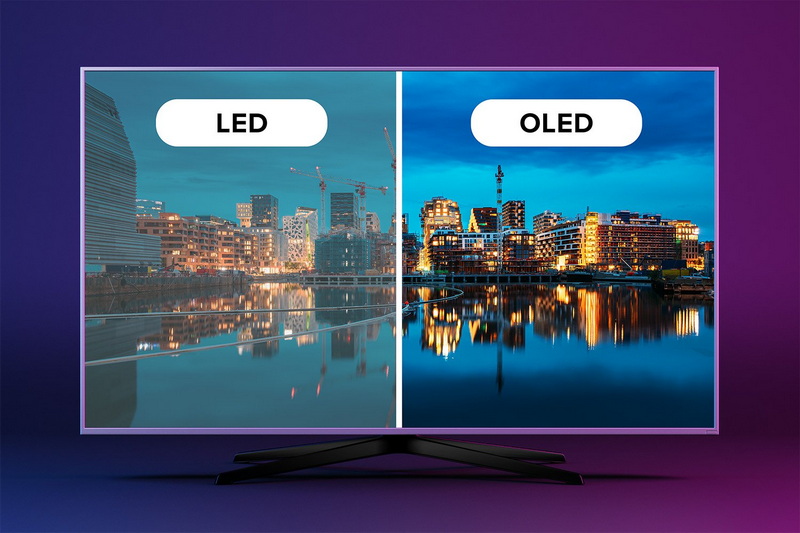
OLED (Organic Light Emitting Diode) screens are composed of thin organic layers that emit light when electric current passes through them. Unlike traditional LED displays, OLEDs are self-emissive and do not require backlighting, offering superior contrast, deeper blacks, and thinner panels. LEDs, by contrast, are point light sources often used as backlights in LCD screens or as external lighting strips[6][9].
Yes, it is generally safe to attach LED light strips to the back of an OLED TV or monitor. LED strips generate very little heat compared to traditional lighting, so they do not damage the OLED panel or affect its performance. Users report no negative effects on the TV when LED strips are mounted on the backside, as long as the lights do not obstruct ventilation or cause excessive heat buildup[1][3][8].
- Enhanced Visual Experience: LED backlighting creates ambient bias lighting that reduces eye strain by softening the contrast between the bright screen and dark room surroundings. This makes watching content more comfortable for extended periods[4].
- Improved Color Perception: Ambient lighting can enhance the perceived vibrancy of on-screen colors, making images appear more vivid and immersive.
- Aesthetic Appeal: LED strips add a sleek, modern look to the TV setup and can be customized with colors and effects to match room decor or mood.
- Energy Efficiency: LED strips consume very little power and are cost-effective to run continuously.
- Customizability: Many LED strips come with remote controls or apps allowing color changes, brightness adjustments, and syncing with on-screen content for dynamic lighting effects[3][4].
Materials Needed:
- LED light strips (preferably with adhesive backing)
- Controller (remote or app-based)
- Cleaning supplies (isopropyl alcohol, cloth)
- Optional: cable clips or plastic clips for extra adhesion
Step-by-Step Installation:
1. Measure the TV Back: Measure the length of the TV's backside where you want to place the LED strips to ensure proper fit.
2. Clean the Surface: Wipe the back of the TV with isopropyl alcohol to remove dust and oils, ensuring good adhesion.
3. Cut LED Strips to Size: Most LED strips can be cut at designated points to fit the TV's dimensions.
4. Attach LED Strips: Peel off the adhesive backing and carefully stick the LED strips along the edges or perimeter of the TV's backside. Use plastic clips if the adhesive is weak, especially on larger or hotter TVs[4][7].
5. Connect Controller and Power: Plug the LED strips into their controller and then into a power source, often a USB port on the TV or wall outlet.
6. Secure Wires: Use cable clips to tidy up any loose wires and prevent them from hanging or being visible.
7. Test and Adjust: Turn on the LED lights and TV to test the setup. Adjust colors, brightness, and effects as desired.
Tips:
- Avoid placing LED strips where they block infrared sensors or ventilation areas.
- Use bias lighting with a color temperature close to daylight (around 6500K) to reduce eye strain.
- Consider smart LED strips that can sync with TV content for immersive lighting effects[4][5][7].
- Govee Immersion Backlight: Uses a camera to sync LED colors with on-screen content; can be mounted slightly off-center to avoid blocking TV sensors[3][5].
- Philips Hue Play Light Bars: Premium option with dynamic color syncing and app control.
- Medialight LX1 or Flex MK2: Designed for bias lighting with accurate white light to reduce eye strain without altering screen colors[1].
- Heat Generation: LED strips produce minimal heat, so they are safe for OLEDs. Avoid incandescent or other high-heat lights[3][8].
- Adhesion Issues: The adhesive on LED strips may weaken over time, especially on warm surfaces. Using additional clips or mounting brackets can improve longevity[7].
- Interference with TV Sensors: Cameras or sensors for dynamic lighting should be placed carefully to avoid obstructing the TV's IR receiver or other sensors. Off-center mounting and calibration can solve this[5].
- Light Pollution: Overly bright or rapidly changing lights can be distracting. Most LED systems allow brightness and effect adjustments to suit personal preference[5].
Attaching LED lights to the back of an OLED screen is a safe, effective way to enhance your viewing environment. LED strips provide ambient bias lighting that reduces eye strain, improves color perception, and adds aesthetic appeal without harming the OLED panel. Proper installation involves cleaning the TV back, measuring and cutting LED strips to size, securing them with adhesive or clips, and careful placement to avoid blocking sensors. With a variety of LED backlighting products available, users can customize their setup for static or dynamic lighting effects that complement their OLED display perfectly.

No, LED backlights generate very little heat and do not damage OLED screens if installed properly without blocking ventilation[1][3][8].
Clean the back surface, measure and cut the LED strips, attach them with adhesive or clips, connect the controller, and test the lighting. Avoid covering sensors or vents[4][7].
Dynamic backlights that sync with screen content can enhance immersion, but some users find them gimmicky. Static bias lighting is simpler and effective for reducing eye strain[1][3].
LED strips with low heat output, good adhesive, and app or remote control are recommended. Brands like Govee and Philips Hue are popular choices[3][5].
Yes, bias lighting created by LED strips reduces contrast between the bright screen and dark room, minimizing eye fatigue during long viewing sessions[4][6].


