


Content Menu
● What Does "Is My Display LCD or LED?" Mean?
● How LCD and LED Displays Work
>> The Inner Workings of LCD Displays
>> The Evolution to LED Displays
● Key Differences Between LCD and LED Displays
● How to Identify If Your Display Is LCD or LED
● Advantages and Disadvantages of LCD and LED Displays
>> Disadvantages of LCD Displays
>> Disadvantages of LED Displays
● Types of LED Backlighting Explained
● LCD vs LED in Video Walls and Large Displays
● Practical Advice: Which Display Is Better for You?
● Frequently Asked Questions (FAQs)
>> 1. How can I tell if my computer monitor is LCD or LED?
>> 2. Are LED displays better than LCD?
>> 3. Can an LED display be considered an LCD?
>> 4. What are the disadvantages of LED displays?
>> 5. Is OLED the same as LED or LCD?
When you look at your computer monitor, TV, or smartphone screen, you might wonder, “Is my display LCD or LED?” This question is more common than you might think, and the answer can influence your experience with image quality, energy consumption, device lifespan, and even your budget. In this detailed article, we will explore the differences between LCD and LED displays, how to identify your screen type, their pros and cons, and practical advice to help you make informed decisions about your devices.
At first glance, the terms LCD and LED might seem like completely different technologies, but the relationship between them is more nuanced. Both LCD and LED displays use liquid crystal technology to create images, but they differ primarily in the type of backlighting used.
- LCD (Liquid Crystal Display) screens rely on liquid crystals to control light but require a backlight to illuminate the screen. Traditionally, this backlight was made up of fluorescent tubes.
- LED (Light Emitting Diode) displays are actually a type of LCD screen that uses LEDs as the backlight source instead of fluorescent lamps. This subtle difference leads to improvements in energy efficiency, brightness, and image quality.
Understanding this distinction is key to answering the question, “Is my display LCD or LED?” and to appreciating the advantages and limitations of each technology.
LCD technology is based on liquid crystals that can twist and align to block or allow light to pass through. These crystals themselves do not emit light; they act as shutters that modulate the light coming from a backlight.
- The backlight in traditional LCDs is typically composed of cold cathode fluorescent lamps (CCFLs), which shine light uniformly across the screen.
- The liquid crystals adjust their orientation in response to electrical signals, controlling how much light passes through each pixel.
- Color filters overlay the liquid crystals to produce red, green, and blue subpixels, which combine to create the full spectrum of colors.
- Since the backlight is always on, LCDs can struggle with producing true blacks, often resulting in grayer dark scenes.
- The thickness of CCFL tubes contributes to the bulkiness of older LCD monitors.
LED displays are essentially LCDs with a different backlighting system:
- Instead of fluorescent tubes, LEDs (Light Emitting Diodes) provide the backlight. LEDs are smaller, more energy-efficient, and can be arranged in various configurations.
- Edge-lit LED displays place LEDs along the edges of the screen, allowing for thinner designs.
- Full-array LED displays position LEDs behind the entire screen, enabling local dimming - the ability to dim or brighten specific zones for better contrast.
- Some LED displays, called Direct View LED (DVLED) or simply LED displays, use tiny LEDs as the pixels themselves, emitting light directly without a liquid crystal layer. These are common in large video walls and outdoor displays.
- LED backlighting allows for higher brightness levels, deeper blacks, and improved color accuracy compared to traditional LCDs.

| Feature | LCD (CCFL Backlight) | LED (LED Backlight) |
|---|---|---|
| Backlighting | Fluorescent lamps (CCFL) | Light Emitting Diodes (LEDs) |
| Energy Efficiency | Moderate | High |
| Contrast Ratio | Moderate | High (local dimming improves blacks) |
| Color Accuracy | Good | Better |
| Thickness | Thicker | Thinner (especially edge-lit models) |
| Lifespan | Average (30,000 to 60,000 hours) | Longer (50,000 to 100,000 hours) |
| Price | More affordable | Generally higher |
| Viewing Angles | Narrower (varies by panel type) | Wider (especially IPS LED models) |
| Brightness | Lower maximum brightness | Higher maximum brightness |
| Black Levels | Blacks appear grayish due to backlight bleed | Deeper blacks with local dimming |
| Durability | More fragile | More durable and shock resistant |
If you want to know what type of display you have, here are some practical steps:
- Check the device specifications: The easiest way is to look up your device model online or consult the user manual. Manufacturers usually specify the display technology.
- Look for “LED backlit” in the product description: If you see this phrase, your display uses LED backlighting.
- Consider the age and thickness of your device: Older and thicker monitors generally use CCFL backlights (LCD), while newer, slimmer models use LED backlighting.
- Observe brightness and contrast: If your screen can get very bright and shows deep blacks, it is likely an LED display.
- Price point: LED displays tend to be more expensive than CCFL-backlit LCDs.
- Physical inspection: If your display is very thin and lightweight, it is more likely LED-backlit.
- Cost-effective: Generally cheaper than LED displays, making them accessible for budget-conscious buyers.
- Good color reproduction: Suitable for everyday use, office work, and casual entertainment.
- No screen burn-in: Unlike some OLED displays, LCDs do not suffer from image retention.
- Lower heat emission: CCFL backlights generate less heat compared to some LED configurations.
- Bulkier design: CCFL backlights require more space, resulting in thicker monitors.
- Lower contrast and brightness: Blacks tend to appear grayish, and the screen may not be bright enough in well-lit environments.
- Shorter backlight lifespan: Fluorescent lamps degrade faster than LEDs.
- Narrower viewing angles: Colors and brightness may shift when viewed from the side.
- Energy-efficient: LEDs consume less power, reducing electricity bills and environmental impact.
- Slim and lightweight: LED backlighting allows for ultra-thin designs.
- Superior image quality: Higher contrast ratios, deeper blacks, and better color accuracy.
- Longer lifespan: LEDs last significantly longer than CCFL lamps.
- Better viewing angles: Especially with IPS panel technology combined with LED backlighting.
- Higher brightness: Suitable for bright rooms and outdoor use.
- Higher initial cost: LED displays tend to be more expensive upfront.
- Potential flicker: Some LED displays use pulse-width modulation (PWM) to control brightness, which can cause eye strain for sensitive users.
- Light pollution: Very bright LED screens can cause glare or discomfort in dark environments.
- Uneven lighting in edge-lit models: Edge-lit LEDs may have less uniform brightness compared to full-array models.
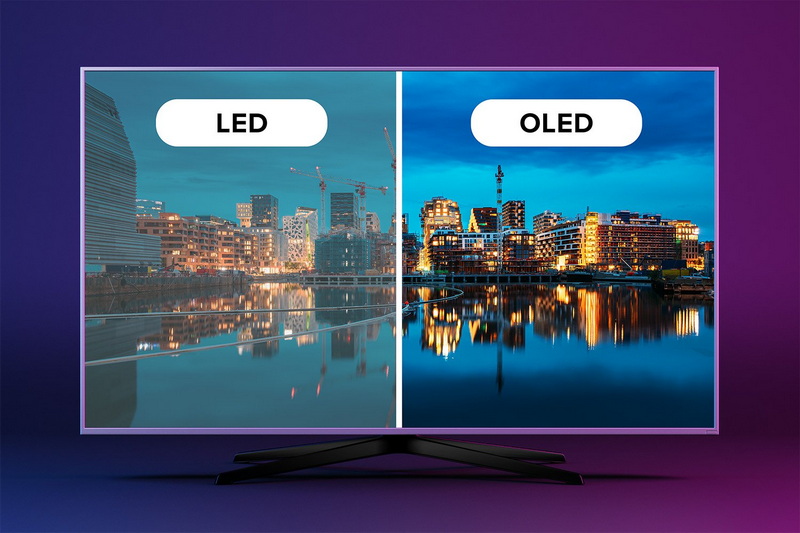
- Edge-lit LED: LEDs are positioned along the edges of the display panel. This design enables thinner screens but may cause uneven brightness or “hot spots” in some cases.
- Full-array LED: LEDs are distributed evenly behind the entire screen surface. This allows for local dimming, where different screen zones can be dimmed independently to enhance contrast and black levels.
- Direct View LED (DVLED): Each pixel is a tiny LED that emits its own light. This technology is used in large-scale displays such as stadium screens and digital billboards, offering seamless images without bezels and exceptional brightness.
When it comes to large-scale digital signage or video walls, the choice between LCD and LED becomes even more critical.
- LCD video walls consist of multiple LCD panels tiled together. While cost-effective, the bezels between panels create visible seams, breaking the image continuity.
- LED video walls use direct-view LED tiles that fit seamlessly, offering uninterrupted visuals with higher brightness and better contrast.
- LED walls are ideal for outdoor and large venues due to their durability and visibility in bright sunlight.
- LCD walls are more common indoors where extreme brightness is not necessary, and budget constraints exist.
Choosing between LCD and LED depends on your specific needs:
- Budget buyers or casual users: Traditional LCD displays with CCFL backlighting might be sufficient.
- Gamers, creative professionals, and media enthusiasts: LED displays provide better color accuracy, contrast, and responsiveness.
- Energy-conscious users: LED displays consume less power and last longer.
- Large-scale commercial signage: LED video walls offer superior brightness and seamless images.
- Users sensitive to flicker: Look for LED displays with flicker-free technology or consider LCDs if flicker is a concern.
Understanding whether your display is LCD or LED boils down to recognizing the backlighting technology and how it affects image production. While both use liquid crystals to control light, LED displays use advanced, energy-efficient LEDs for backlighting or direct emission, resulting in better brightness, deeper blacks, improved color accuracy, and longer lifespan. LCDs with fluorescent backlights remain a budget-friendly option but are gradually being replaced by LED technology in most applications due to these advantages.
Knowing these differences empowers you to choose the right display for your needs-whether for work, gaming, entertainment, or large-scale digital signage-and to optimize your viewing experience accordingly.

Look up your monitor's model specifications or user manual. If it mentions “LED backlit,” your monitor uses LED technology. Older monitors with fluorescent backlights are LCD.
Generally, yes. LED displays offer higher energy efficiency, better contrast, brightness, and color accuracy compared to traditional LCDs with fluorescent backlights.
Most LED displays are a type of LCD that uses LED backlighting instead of fluorescent lamps. However, direct-view LED displays are a separate technology where each pixel emits light directly.
They tend to be more expensive, may cause eye strain due to flickering in some models, and can produce glare in very bright environments.
No. OLED uses organic compounds that emit light individually for each pixel, eliminating the need for a backlight and offering superior contrast and color compared to both LCD and LED displays.


