

Views: 222 Author: Tina Publish Time: 2025-04-26 Origin: Site


Content Menu
● Does the Surface Pro 11 Come with an OLED Screen?
● Advantages of the Surface Pro 11 OLED Screen
>> Superior Contrast and Color Depth
>> High Brightness and HDR Support
>> Smooth Visuals with 120Hz Refresh Rate
● User Experience and Criticisms of the OLED Display
>> Screen Door Effect and Graininess
>> Viewing Angles and Reflections
>> Burn-in Risk
● Comparison Table: OLED vs. LCD on Surface Pro 11
● Frequently Asked Questions (FAQs)
>> 1. Does the Surface Pro 11 come with an OLED screen option?
>> 2. What are the benefits of the Surface Pro 11 OLED display?
>> 3. Are there any issues with the Surface Pro 11 OLED screen?
>> 4. How does the OLED display compare to the LCD display on the Surface Pro 11?
>> 5. Is the OLED screen worth the extra cost on the Surface Pro 11?
The Microsoft Surface Pro 11 is a significant evolution in the Surface Pro lineup, and one of its standout features is the availability of an OLED screen option. This article explores in detail whether the Surface Pro 11 comes with an OLED screen, the specifications and benefits of this display technology, user experiences, and how it compares to the traditional LCD option. We will also address common questions related to the Surface Pro 11's OLED display.
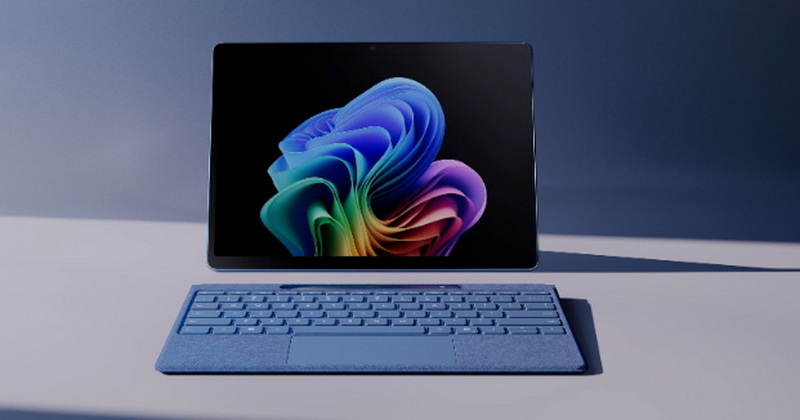
Yes, the Surface Pro 11 offers an OLED screen option alongside the standard LCD display. Microsoft introduced this OLED variant as part of the 11th generation Surface Pro models, marking the first time the Surface Pro line includes an OLED display option[1][2][3].
- Screen Size: 13 inches
- Resolution: 2880 x 1920 pixels (267 PPI)
- Aspect Ratio: 3:2
- Refresh Rate: Up to 120Hz dynamic refresh rate
- Contrast Ratio: 1,000,000:1 (OLED) vs. 1,200:1 (LCD)
- Color Profile: sRGB and Vivid, individually color-calibrated
- Touch: 10-point multi-touch
- Additional Features: Dolby Vision IQ, Adaptive Color, Adaptive Contrast, Auto Color Management, Corning Gorilla Glass 5 protection[1][3][13]
The OLED version is powered by the Qualcomm Snapdragon X Elite processor, whereas the LCD version typically uses the Snapdragon X Plus or Intel Core Ultra processors[3].
The OLED screen delivers a vastly superior contrast ratio of 1,000,000:1 compared to the LCD's 1,200:1. This means blacks are truly black because OLED pixels can turn off individually, enhancing the overall picture quality and depth. Colors appear more vibrant and lifelike, making it ideal for media consumption, photo editing, and creative work[1][2][16].
The OLED display on the Surface Pro 11 reaches peak brightness levels of around 535 to 600 nits, which is unusually bright for an OLED panel. It supports Dolby Vision HDR and Dolby Vision IQ, providing an enhanced viewing experience with vivid colors and dynamic range[1][2][16][17].
Both OLED and LCD versions support a 120Hz dynamic refresh rate, improving smoothness during scrolling, gaming, and video playback. This feature adapts the refresh rate based on activity to save battery life while providing fluid visuals when needed[1][3][16].

While the OLED screen is praised for its brightness, color accuracy, and contrast, some users have reported issues:
Several users have noticed a "screen door effect" or visible grid pattern on the OLED display, especially when viewing bright backgrounds or text. This effect is caused by the digitizer layer and subpixel arrangement in the touchscreen OLED panel. Some find this distracting during productivity tasks like working in Excel or web browsing, while others barely notice it[4][7][8][16].
Some users report that certain images, especially those with dark scenes or sunsets, appear washed out or less saturated on the OLED compared to IPS LCDs. This is related to the gamma settings and the way OLED displays render colors, sometimes making dark areas look lighter than expected[10].
OLED displays tend to have more color shift when viewed from angles compared to IPS LCDs. The glossy finish on the Surface Pro 11 OLED can also cause reflections in bright environments, which might be bothersome outdoors[16].
OLED technology is susceptible to burn-in over time, especially with static UI elements. While Microsoft has not highlighted this as a major issue, it remains a consideration for long-term use[16].
| Feature | OLED Display | LCD Display |
|---|---|---|
| Resolution | 2880 x 1920 (267 PPI) | 2880 x 1920 (267 PPI) |
| Screen Size | 13 inches | 13 inches |
| Contrast Ratio | 1,000,000:1 | 1,200:1 |
| Brightness (Peak) | ~535-600 nits | ~535-600 nits |
| Color Accuracy | High, vivid colors | High, but less contrast |
| Refresh Rate | Up to 120Hz dynamic | Up to 120Hz dynamic |
| Viewing Angles | Color shift at angles | Better color stability at angles |
| Screen Door Effect | Noticeable to some users | Not present |
| Burn-in Risk | Potential issue | No risk |
| Price Premium | Approx. $500 more than LCD model | Base price |
The Microsoft Surface Pro 11 indeed comes with an OLED screen option, offering a premium display experience with exceptional contrast, brightness, and color vibrancy. This makes it an excellent choice for users who prioritize media consumption, creative work, and a visually stunning display.
However, the OLED variant is not without its drawbacks. Some users report a visible screen door effect, color rendering quirks, and potential burn-in risks inherent to OLED technology. The LCD model remains a solid alternative for those who prefer a more traditional display without these concerns and at a lower price point.
Choosing between the OLED and LCD Surface Pro 11 largely depends on your use case and sensitivity to the OLED's unique characteristics. For those who want the best visual experience and are willing to pay a premium, the OLED model is a compelling upgrade. For productivity-focused users or those sensitive to display artifacts, the LCD model is still very capable.

Yes, the Surface Pro 11 offers both OLED and LCD screen options. The OLED display is available on higher-end models powered by the Snapdragon X Elite or Intel Core Ultra 7 processors[1][3].
The OLED screen provides a much higher contrast ratio (1,000,000:1), deeper blacks, more vibrant colors, Dolby Vision HDR support, and a smooth 120Hz refresh rate, enhancing media and creative work experiences[1][2][16].
Some users report a visible "screen door effect" due to the digitizer layer, slight color washout in certain images, reflections from the glossy finish, and the inherent risk of OLED burn-in over time[4][7][8][16].
The OLED display has superior contrast and color vibrancy but may have viewing angle color shifts and screen door effect issues. The LCD display offers more consistent viewing angles and no burn-in risk but with lower contrast[16].
If you prioritize display quality for media consumption, photo editing, or creative tasks, the OLED screen is worth the premium. For general productivity or budget-conscious buyers, the LCD version remains a strong choice[2][16].
[1] https://www.microsoft.com/ja-jp/surface/devices/surface-pro-11th-edition
[2] https://www.tomsguide.com/tablets/surface-pro-11
[3] https://en.wikipedia.org/wiki/Surface_Pro_(11th_generation)
[4] https://www.reddit.com/r/Surface/comments/1dqa0sn/images_of_the_surface_oled_screen_door_effect/
[5] https://www.youtube.com/watch?v=x4Qgf2J3tNI
[6] https://www.microsoft.com/en-us/surface/devices/surface-pro-11th-edition
[7] https://www.reddit.com/r/Surface/comments/1djn8rp/dont_understand_surface_pro_11_oled_criticism/
[8] https://www.reddit.com/r/Surface/comments/1h3zi5c/surface_pro_11_oled_display_issues_rantquestion/
[9] https://www.microsoft.com/ja-jp/surface/business/surface-pro-intel-11th-edition
[10] https://answers.microsoft.com/en-us/surface/forum/all/surface-pro-11-oled-display/759deb88-8226-4565-bf6e-b8a93dfb1479
[11] https://www.youtube.com/watch?v=mYk6Uvh_pCw
[12] https://pc.watch.impress.co.jp/docs/news/1593103.html
[13] https://www.microsoft.com/en-in/surface/devices/surface-pro-11th-edition
[14] https://www.theverge.com/24191243/microsoft-surface-pro-11-oled-review
[15] https://www.youtube.com/watch?v=rE5CBdFwt4s
[16] https://www.rtings.com/laptop/reviews/microsoft/surface-pro-11th-edition-2024
[17] https://www.livescience.com/technology/microsoft-surface-pro-11-review
[18] https://www.microsoft.com/ja-jp/surface/business/surface-pro-11th-edition
[19] https://www.biccamera.com/bc/item/13693327/
[20] https://www.ksdenki.com/shop/g/g4549576239453/
[21] https://my-best.com/products/3580980
[22] https://cdn-dynmedia-1.microsoft.com/is/content/microsoftcorp/microsoft/final/ja-jp/microsoft-brand/documents/mcaps-view-the-surface-pro-11th-generation-leaflet-for-business.pdf
[23] https://www.sofmap.com/contents/?id=surface&sid=pro11
[24] https://cdn-dynmedia-1.microsoft.com/is/content/microsoftcorp/microsoft/final/en-us/microsoft-brand/documents/mcaps-atlife-microsoft-surface-catalog.pdf
[25] https://www.tanomail.com/product/0833808/
[26] https://item.rakuten.co.jp/microsoft-store/pro11-o2024-3/
[27] https://www.microsoft.com/en-us/surface/devices/surface-pro-11th-edition
[28] https://kakaku.com/item/J0000044788/
[29] https://pc.watch.impress.co.jp/docs/column/ubiq/1593945.html
[30] https://support.microsoft.com/ja-jp/surface/surface-%E3%81%A7%E5%86%99%E7%9C%9F%E3%82%84%E3%83%93%E3%83%87%E3%82%AA%E3%82%92%E6%92%AE%E5%BD%B1%E3%81%99%E3%82%8B-419d8113-79e4-bf93-ee8a-2225a55c44d5
[31] https://www.reddit.com/r/Surface/comments/1euz4uu/my_short_review_on_the_surface_pro_11_oled/
[32] https://www.reddit.com/r/Surface/comments/1dz54uz/surface_pro_11_lcdx_plus_vs_oledx_elite/
[33] https://www.microsoft.com/ja-jp/surface/devices/surface-pro-11th-edition
[34] https://support.microsoft.com/ja-jp/surface/surface-%E3%82%92%E5%A4%96%E9%83%A8%E3%83%87%E3%82%A3%E3%82%B9%E3%83%97%E3%83%AC%E3%82%A4%E3%81%AB%E6%8E%A5%E7%B6%9A%E3%81%99%E3%82%8B-35c3aed4-f6c3-2767-d028-2c8ddbd2ee29
[35] https://www.youtube.com/watch?v=FfyPz4jUvq4
[36] https://www.youtube.com/watch?v=fSdxGlqJ1t8
[37] https://www.microsoft.com/en-sa/surface/devices/surface-pro-11th-edition
[38] https://www.youtube.com/watch?v=KMmz3bazXXQ
[39] https://www.youtube.com/watch?v=afBo1_6AMIQ
[40] https://support.microsoft.com/en-us/surface-pro
[41] https://answers.microsoft.com/en-us/surface/forum/all/surface-pro-11-warranty-question-and-help-needed/cddb8c0a-355f-4dd0-989f-525e1205679d
[42] https://www.reddit.com/r/Surface/comments/1f7ull9/surface_pro_11_and_software_computability_problems/
[43] https://answers.microsoft.com/en-us/surface/forum/all/welcome-to-the-surface-pro-11th-edition-community/ebe9cf09-df5d-488b-926a-e0952bd99d80
[44] https://www.easeus.com/partition-master/surface-pro-black-screen.html
[45] https://www.reddit.com/r/surfacepro/comments/1hf7fch/surface_pro_11_software_installation_question/
[46] https://www.youtube.com/watch?v=F2QBVSOKHdE
[47] https://jp.ifixit.com/Device/Microsoft_Surface_Pro
[48] https://www.theverge.com/24191243/microsoft-surface-pro-11-oled-review
[49] https://www.youtube.com/watch?v=eDqkCth6nak
[50] https://www.microsoft.com/en-gb/surface/devices/surface-pro-11th-edition
[51] https://community.claris.com/en/s/question/0D5Vy00000DWasUKAT/i-am-being-forced-to-buy-a-microsoft-surface-pro-11th-edition-as-a-secondary-device-any-likely-issues-for-addhoc-development-on-the-run
[52] https://www.vietnam.vn/ja/ipad-pro-va-surface-pro-moi-chung-minh-oled-la-man-hinh-cua-tuong-lai
[53] https://kakakumag.com/pc-smartphone/?id=21670
[54] https://www.youtube.com/watch?v=PIm-iSQfJfc


